This is a read-only mirror of pymolwiki.org
Difference between revisions of "Unbond"
Jump to navigation
Jump to search
m (7 revisions) |
|||
| (6 intermediate revisions by one other user not shown) | |||
| Line 1: | Line 1: | ||
| − | + | ||
| − | + | '''unbond''' removes all bonds between two selections. | |
| − | + | ||
| − | + | <gallery> | |
| − | + | Image:Unbond1.png|Atoms bound normally, but not the representation we want. | |
| − | + | Image:Unbond2.png|Atoms unboud with the unbound command. | |
| − | + | </gallery> | |
| − | + | =USAGE= | |
| − | = | + | <source lang="python"> |
| − | <source lang="python"> | + | unbond atom1,atom2 |
| − | |||
</source> | </source> | ||
| − | === | + | =PYMOL API= |
| − | + | <source lang="python"> | |
| − | + | cmd.unbond(selection atom1="(pk1)",selection atom2="(pk2)") | |
| − | + | </source> | |
| + | |||
| + | = Example = | ||
| + | <source lang="python"> | ||
| + | # remove all bonds in residue 999 to residue 999 | ||
| + | # this command was used in the examples above in PDB ID 1ACO. | ||
| + | unbond i. 999, i. 999 | ||
| + | </source> | ||
| + | =SEE ALSO= | ||
| + | [[Bond]], [[Fuse]], [[Remove_picked]], [[Attach]], [[Detach]], [[Replace]] | ||
| − | [[Category:Commands| | + | [[Category:Commands|Unbond]] |
| + | [[Category:Editing Module|Unbond]] | ||
Latest revision as of 01:44, 28 March 2014
unbond removes all bonds between two selections.
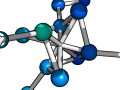
Atoms bound normally, but not the representation we want.
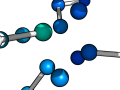
Atoms unboud with the unbound command.


USAGE
unbond atom1,atom2
PYMOL API
cmd.unbond(selection atom1="(pk1)",selection atom2="(pk2)")
Example
# remove all bonds in residue 999 to residue 999
# this command was used in the examples above in PDB ID 1ACO.
unbond i. 999, i. 999