This is a read-only mirror of pymolwiki.org
Difference between revisions of "Sticks"
Jump to navigation
Jump to search
m (11 revisions) |
|||
| (7 intermediate revisions by one other user not shown) | |||
| Line 1: | Line 1: | ||
| − | A simple PyMol representation. Use | + | = Overview = |
| − | < | + | A simple PyMol representation where bonds are drawn as sticks. Use |
| − | + | <source lang="python"> | |
| − | </ | + | # using the show command, for some SELECTION |
| + | show sticks, SELECTION | ||
| + | |||
| + | # using the as command | ||
| + | as sticks, SELECTION | ||
| + | </source> | ||
where SELECTION is a valid selection or previously defined selection name. | where SELECTION is a valid selection or previously defined selection name. | ||
| + | <gallery> | ||
| + | Image:Sticks_ex.png|Example Sticks Representation | ||
| + | </gallery> | ||
| − | == Sticks Radius (Sticks Weight)== | + | ==Settings== |
| + | *[[stick_ball]] | ||
| + | *[[stick_nub]] | ||
| + | *[[stick_transparency]] | ||
| + | *[[stick_ball_ratio]] | ||
| + | *[[stick_overlap]] | ||
| + | *[[stick_valence_scale]] | ||
| + | *[[stick_color]] | ||
| + | *[[stick_quality]] | ||
| + | *[[stick_fixed_radius]] | ||
| + | *[[stick_radius]] | ||
| + | *[[set_bond]] | ||
| + | |||
| + | ===Example Settings=== | ||
| + | === Color Sticks=== | ||
| + | Use [[set_bond]] to set stick-bond settings, like color: | ||
| + | <source lang="python"> | ||
| + | set_bond 1foo and i. XYZ, color red | ||
| + | </source> | ||
| + | |||
| + | ==== Sticks Radius (Sticks Weight)==== | ||
To change the radius for sticks, enter the following: | To change the radius for sticks, enter the following: | ||
| − | + | <source lang="python"> | |
| + | set stick_radius, VALUE | ||
| + | </source> | ||
where | where | ||
0.0<=VALUE<=1.0 | 0.0<=VALUE<=1.0 | ||
| − | '''1.0''' is 100% or full radius | + | *'''1.0''' is 100% or full radius |
| + | *'''0.0''' is 0% or invisible -- so use at least 0.1 or greater | ||
| + | *The default value is: ~0.3 | ||
| − | + | ====Sticks Transparency==== | |
| − | |||
| − | ==Sticks Transparency== | ||
To enable transparency for sticks, enter the following: | To enable transparency for sticks, enter the following: | ||
| − | + | <source lang="python"> | |
| − | where | + | set stick_transparency, VALUE |
| − | + | </source> | |
| − | + | where ''0.0<=VALUE<=1.0'' | |
| − | |||
| − | |||
| − | |||
| − | |||
| − | |||
| − | |||
| − | |||
| + | *'''1.0''' is 100% transparent -- so invisible | ||
| + | *'''0.0''' is 0% transparent -- so opaque | ||
| − | + | <source lang="python"> | |
| + | set stick_transparency, 0.45 | ||
| + | </source> | ||
[[Category:Representations|Sticks]] | [[Category:Representations|Sticks]] | ||
| + | [[Category:Sticks]] | ||
Latest revision as of 01:44, 28 March 2014
Overview
A simple PyMol representation where bonds are drawn as sticks. Use
# using the show command, for some SELECTION
show sticks, SELECTION

# using the as command
as sticks, SELECTION
where SELECTION is a valid selection or previously defined selection name.
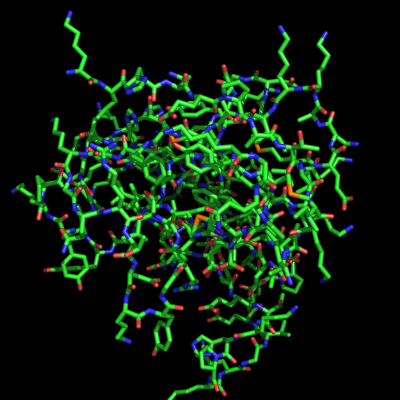
Example Sticks Representation

Settings
- stick_ball
- stick_nub
- stick_transparency
- stick_ball_ratio
- stick_overlap
- stick_valence_scale
- stick_color
- stick_quality
- stick_fixed_radius
- stick_radius
- set_bond
Example Settings
Color Sticks
Use set_bond to set stick-bond settings, like color:
set_bond 1foo and i. XYZ, color red
Sticks Radius (Sticks Weight)
To change the radius for sticks, enter the following:
set stick_radius, VALUE
where
0.0<=VALUE<=1.0
- 1.0 is 100% or full radius
- 0.0 is 0% or invisible -- so use at least 0.1 or greater
- The default value is: ~0.3
Sticks Transparency
To enable transparency for sticks, enter the following:
set stick_transparency, VALUE
where 0.0<=VALUE<=1.0
- 1.0 is 100% transparent -- so invisible
- 0.0 is 0% transparent -- so opaque
set stick_transparency, 0.45