This is a read-only mirror of pymolwiki.org
Difference between revisions of "Cartoon Helix Settings"
Jump to navigation
Jump to search
| (3 intermediate revisions by the same user not shown) | |||
| Line 1: | Line 1: | ||
==Overview== | ==Overview== | ||
| − | + | This setting sets the style in which [[Cartoon|cartoon]] helices are rendered. The default is a helix with an ellipsoid cross section. '''Fancy''' mode helices are ribbons with tubular edges à la [[MolScript]]. Cylindicial mode renders helices as solid cylinders. | |
| − | |||
| − | |||
==Syntax== | ==Syntax== | ||
| Line 14: | Line 12: | ||
set cartoon_fancy_helices, 0 | set cartoon_fancy_helices, 0 | ||
set cartoon_cylindrical_helices, 0 | set cartoon_cylindrical_helices, 0 | ||
| + | |||
| + | To change the size of the cartoon helices when not in the fancy helix mode | ||
| + | set cartoon_oval_radius , 0.8 | ||
| + | and | ||
| + | set cartoon_oval_width , 0.2 | ||
==Result== | ==Result== | ||
| − | + | <gallery> | |
| − | + | image:Fancy.JPG|Fancy helix|center | |
| − | + | image:Cylindre.JPG|Cylindrical helix | |
| − | + | image:default.JPG|Default representation | |
| − | + | </gallery> | |
| + | |||
| + | [[Category:Settings|Cartoon helix settings]] | ||
Revision as of 01:42, 9 May 2008
Overview
This setting sets the style in which cartoon helices are rendered. The default is a helix with an ellipsoid cross section. Fancy mode helices are ribbons with tubular edges à la MolScript. Cylindicial mode renders helices as solid cylinders.
Syntax
To turn on Fancy Helices:
set cartoon_fancy_helices, 1
To turn on Cylindrical Helices:
set cartoon_cylindrical_helices, 1
To return to default helices:
set cartoon_fancy_helices, 0
set cartoon_cylindrical_helices, 0
To change the size of the cartoon helices when not in the fancy helix mode
set cartoon_oval_radius , 0.8
and
set cartoon_oval_width , 0.2
Result
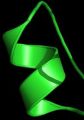
center
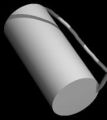
Cylindrical helix

Default representation


