This is a read-only mirror of pymolwiki.org
Difference between revisions of "Stick ball"
Jump to navigation
Jump to search
(add ball radius) |
|||
| (One intermediate revision by the same user not shown) | |||
| Line 7: | Line 7: | ||
set stick_ball, on # displays atoms as balls joined by sticks | set stick_ball, on # displays atoms as balls joined by sticks | ||
set stick_ball, off # displays only connected sticks | set stick_ball, off # displays only connected sticks | ||
| + | |||
| + | set stick_ball_ratio, 1.7 # change the radius of the balls | ||
</source> | </source> | ||
| Line 16: | Line 18: | ||
Image:Stick_ball_ratio_1.5.png|stick_ball "on" with stick_ball_ratio at 1.5 | Image:Stick_ball_ratio_1.5.png|stick_ball "on" with stick_ball_ratio at 1.5 | ||
</gallery> | </gallery> | ||
| + | |||
| + | [[Category:Settings|Stick ball]] | ||
Revision as of 18:21, 19 November 2007
Overview
The setting "stick_ball" controls whether bonded atoms are shown simply as joined sticks (set stick_ball, off) or as traditional "ball-and-stick" representation (set stick_ball, on). Note that simply setting stick_ball on will result in balls with the same radius as the sticks and so will appear only slightly different (the joins will be smoother).
Settings
set stick_ball, on   # displays atoms as balls joined by sticks
set stick_ball, off  # displays only connected sticks

set stick_ball_ratio, 1.7 # change the radius of the balls
Examples
Open the images to actually see the details!
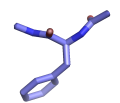
stick_ball, off
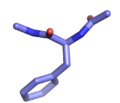
stick_ball, on
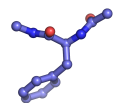
stick_ball "on" with stick_ball_ratio at 1.5


