This is a read-only mirror of pymolwiki.org
Difference between revisions of "Cartoon Helix Settings"
Jump to navigation
Jump to search
m (Fixed à) |
(Edited for cylinders and fancy) |
||
| Line 1: | Line 1: | ||
==Overview== | ==Overview== | ||
| − | + | These are display settings. | |
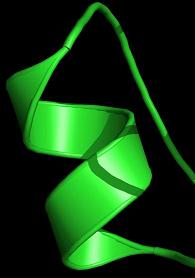
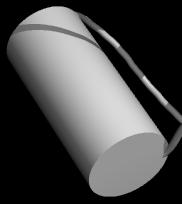
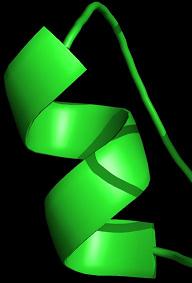
| − | + | These settings set the style in which cartoon helices are rendered. The default is a helix with an ellipsoid cross section. Fancy mode helices are ribbons with tubular edges à la MolScript. Cylindicial mode renders helices as solid cylinders. | |
==Syntax== | ==Syntax== | ||
| − | + | To turn on Fancy Helices: | |
set cartoon_fancy_helices, 1 | set cartoon_fancy_helices, 1 | ||
| − | + | To turn on Cylindrical Helices: | |
| + | set cartoon_cylindrical_helices, 1 | ||
| + | |||
| + | To return to default helices: | ||
set cartoon_fancy_helices, 0 | set cartoon_fancy_helices, 0 | ||
| + | set cartoon_cylindrical_helices, 0 | ||
==Result== | ==Result== | ||
| − | [[image:Fancy.JPG|frame| | + | [[image:Fancy.JPG|frame|Fancy helix|left]] |
| − | [[image:default.JPG|frame| | + | [[image:Cylindre.JPG|frame|Cylindrical helix|center]] |
| + | [[image:default.JPG|frame|Default representation|right]] | ||
Revision as of 18:21, 2 June 2006
Overview
These are display settings.
These settings set the style in which cartoon helices are rendered. The default is a helix with an ellipsoid cross section. Fancy mode helices are ribbons with tubular edges à la MolScript. Cylindicial mode renders helices as solid cylinders.
Syntax
To turn on Fancy Helices:
set cartoon_fancy_helices, 1
To turn on Cylindrical Helices:
set cartoon_cylindrical_helices, 1
To return to default helices:
set cartoon_fancy_helices, 0
set cartoon_cylindrical_helices, 0
Result

Fancy helix

Cylindrical helix

Default representation